Here at the Linuxville chateau, I work on an antiquated laptop of Win95 vintage. It is under powered for the stuff I want to do but adequate for most. It is because I have installed Ubuntu Linux, ver. 9.10 works well, I have slipped past the world of commercial chaos into a sublime state of nerdvana. Besides being free and easy to use I have also discovered Open Source software, standard with Linux, to meet most of my needs. Open Source Software is often found in both Linux and Microsoft platform versions, sometimes Mac versions.
My quest is this, can a digital artist use only open source software, be productive and survive in an Adobe products on Microsoft and Mac PC driven world?
What, you can't be serious, you need Photoshop and/or Illustrator, or............!?@%#, these are what the pros use!!
My main programs are GIMP and Inkscape. I've heard the barks, GIMP doesn't have this and doesn't do that. The truth is they don't mention what GIMP does do and have because they already do that in Photoshop which they bought, own and use, no need for GIMP. I say if I need those things, I know where to find them, thanks. Over the years, I also see that GIMP has/is acquiring some of those not there things. The same with Inkscape.
I had a thought, digital graphics is about tools. In Photoshop a paintbrush works like this, in GIMP the same way. In Illustrator the same as in Inkscape. The tools are all the same. There are differences in the interface, tool options, but the biggest difference is in the file formats. File formats are how one company builds and keeps a user base. If you don't use a certain file format, you can't communicate with that user base. This is why folks push for across the board open formats that anybody can use regardless of the originating software. DOC., PDF., JPG., PNG., are all standard formats. I mentioned "Doc." because this presents the problem. DOC's is a Microsoft standard file format. It is under Microsoft's control, depends upon their permission to use it. They can and have changed it over the years. When a file format enters the public domain, it can be used to control access or gather and maintain a user/customer base. Another area where this is apparent is FONTs. Linux even has an add-on for MS standard fonts. When things hit the public domain, it is nice to have a wide margin of liberty.
My next thing is define "artist". If you went to art school and trained with Adobe products, because they are what pros use, are in the industry, etc; be happy, use what you know to do what you do. Just don't say "you can't do that!" Some artist use water color only, some oil paint only, draw with a No2 pencil. I use GIMP, Inkscape, just discovered SK1 (like Inkscape). There are a few others, but as I said it is about the tools. So for me as an "Artist", it is about using Open Source Software to do art.
How am I doing? You can see some of my works at http://www.lorainartscouncil.com/Arnold-L--Johnson.php
This is the art I do. You might do realistic stuff, cartooning, fine art type painting, vector illustrating, digital finger painting or math generated what ever, 3d.
If you are curious about digital art via Linux and Open Source Software - http://www.linuxgraphicsusers.com/forum/
The folks in the forum are a great mix of pros and noobys.
And by the way, my penthouse main machine (up stairs) is a desktop with the latest Ubuntu 10.10 and assorted artistware. Not top shelf by any means but more power makes the tools work better.
Wednesday, April 13, 2011


Tuesday, April 12, 2011
the science of burrito art
Went to Micky D's for my breakfast burrito fix. All things being equal, training, amount of ingredients and practiced construction technique, I can't help wondering why each burrito is so unique. Is the breakfast pace too hurried, is the burrito maker a rookie, having a off day, or distracted? Or are they dedicated to customer happiness, bucking for manger? Do Hispanics from Mexico make the best burritos (sorry I'm profiling)?
Some days they are stuffed, some days they are wimpy, some days dry and some days I wait for the Mariachi band to serenade while I whiff and savior. Why is the Linuxville guy hawking burritos? I'm not but lately I realized that digital art has a kind of stigma in the art world. It is OK as long as it is on a web page or a game or movie effects, a sign or greeting card. You talk about digital art as serious art and people get that burrito questioning look in their eyes. Hey it's not the art educated high mucky mucks who are torpedoed, it's the average Joe and JoAnn who are still stuck on traditional media. Even the obvious repro needs to have once had brush strokes. I have seen total digital prints covered with gesso and stroked with a brush to enhance it for sale. They wouldn't do that to a silk-screen or a lithograph! OK, they might.
But....all things being equal, the hardware, the software, the training to use it all and still each digital artwork is so unique, hmmmmmm! Then print it, mount it, and hang it. You see I know that if Micky D's didn't have a procedure to stop the burrito maker at the right moment, it would cost $5 each. When we come to digital art, because of the possibilities of the media (so close to photography, animation and movies), we expect so much. The trick is to stop the digital art maker at the right moment so that a $100 picture doesn't cost you $500. The diff? At $100 you can savior, at $500 you buy insurance and a security system. I am talking niche buying, if you chose to spend more, go for it. The fancy restaurants all have their atmosphere plus more substantial burritos (extra for parsley sprig).
Digital art is causing a lot of reconsidering what art is. I can draw a mathematically perfect circle or squiggly lopsided oval or a sketchy round thing, all on my PC. I can alter it, copy it, shrink it or enlarge it. Still, when I am done will it be art? The PC is just another tool/media with it's own procedures and outcomes. You still spend time making art. I am always amazed, this is the art you can make on a PC and this is how it looks when you print it out. The one on the left is a $1 burrito, the right a $5 burrito.........sauce on the side?
Some days they are stuffed, some days they are wimpy, some days dry and some days I wait for the Mariachi band to serenade while I whiff and savior. Why is the Linuxville guy hawking burritos? I'm not but lately I realized that digital art has a kind of stigma in the art world. It is OK as long as it is on a web page or a game or movie effects, a sign or greeting card. You talk about digital art as serious art and people get that burrito questioning look in their eyes. Hey it's not the art educated high mucky mucks who are torpedoed, it's the average Joe and JoAnn who are still stuck on traditional media. Even the obvious repro needs to have once had brush strokes. I have seen total digital prints covered with gesso and stroked with a brush to enhance it for sale. They wouldn't do that to a silk-screen or a lithograph! OK, they might.
But....all things being equal, the hardware, the software, the training to use it all and still each digital artwork is so unique, hmmmmmm! Then print it, mount it, and hang it. You see I know that if Micky D's didn't have a procedure to stop the burrito maker at the right moment, it would cost $5 each. When we come to digital art, because of the possibilities of the media (so close to photography, animation and movies), we expect so much. The trick is to stop the digital art maker at the right moment so that a $100 picture doesn't cost you $500. The diff? At $100 you can savior, at $500 you buy insurance and a security system. I am talking niche buying, if you chose to spend more, go for it. The fancy restaurants all have their atmosphere plus more substantial burritos (extra for parsley sprig).
Digital art is causing a lot of reconsidering what art is. I can draw a mathematically perfect circle or squiggly lopsided oval or a sketchy round thing, all on my PC. I can alter it, copy it, shrink it or enlarge it. Still, when I am done will it be art? The PC is just another tool/media with it's own procedures and outcomes. You still spend time making art. I am always amazed, this is the art you can make on a PC and this is how it looks when you print it out. The one on the left is a $1 burrito, the right a $5 burrito.........sauce on the side?
Friday, April 01, 2011
first impressions
In the Linux world first impressions are usually almost lasting. I stumbled upon my first Linux in the back of a library book. I found it hard to understand. That stuck with me until Linux became easier and I educated. So in that same vein I came across "Linux All-In-One, for Dummies" (4th edition). This is not a crit on the book, it is very wonderful as are the whole "for Dummies" series.
In the back of this book is a DVD with 5 live CD versions of Linux. Ubuntu, Fedora, openSUSE, Mandriva and Mint. To try 5 versions of Linux in a row is quite a coaster ride. I am already an Ubuntu user but this version did not even boot on my ancient laptop (must be ver. 10.4). The Fedora 12 detected a kernel crash on my system. Fedora always says that about my laptop, it's spooky. OpenSUSE came up the fastest but it had the KDE desktop which my biased self doesn't like. Mandriva gives you the choice of KDE or Matisse desktops. Matisse is very different. I think a desktop should let you get on with your work. But if you learn to use KDE or Matisse, I am sure you will have reasons to like them, just don't ask me.
So Ubuntu is cool but not ver. 10.4 on my laptop. And the last one Mint 8 is.............very impressive. I even like the minty green color. OpenSUSE is green too but Mint is nicer green. When you hit the Mint menu button it is clean, good looking and functionally smooth, way better than other distros doing menus the same way. OK, Mint is Ubuntu based and I am familiar, but Mint is a refreshing good design.
It is cool to have 5 tryouts and look at them while your impressions are hot. Of course, once you have settled you can tweak to your hearts content. First impressions carry a lot of weight with us fickle users. If you can have a good entry perhaps going deeper is easier to deal with. So we know, yes if you don't like what you see, you can change it. BUT, some folks don't and they have to like what they see first. If Ubuntu 11.04 won't work on my laptop, I'm going to put Mint on it. And that's a refreshing change.
In the back of this book is a DVD with 5 live CD versions of Linux. Ubuntu, Fedora, openSUSE, Mandriva and Mint. To try 5 versions of Linux in a row is quite a coaster ride. I am already an Ubuntu user but this version did not even boot on my ancient laptop (must be ver. 10.4). The Fedora 12 detected a kernel crash on my system. Fedora always says that about my laptop, it's spooky. OpenSUSE came up the fastest but it had the KDE desktop which my biased self doesn't like. Mandriva gives you the choice of KDE or Matisse desktops. Matisse is very different. I think a desktop should let you get on with your work. But if you learn to use KDE or Matisse, I am sure you will have reasons to like them, just don't ask me.
So Ubuntu is cool but not ver. 10.4 on my laptop. And the last one Mint 8 is.............very impressive. I even like the minty green color. OpenSUSE is green too but Mint is nicer green. When you hit the Mint menu button it is clean, good looking and functionally smooth, way better than other distros doing menus the same way. OK, Mint is Ubuntu based and I am familiar, but Mint is a refreshing good design.
It is cool to have 5 tryouts and look at them while your impressions are hot. Of course, once you have settled you can tweak to your hearts content. First impressions carry a lot of weight with us fickle users. If you can have a good entry perhaps going deeper is easier to deal with. So we know, yes if you don't like what you see, you can change it. BUT, some folks don't and they have to like what they see first. If Ubuntu 11.04 won't work on my laptop, I'm going to put Mint on it. And that's a refreshing change.
Friday, March 25, 2011
Ah! what's a work flow?
What's a workflow? Say you are looking at Blender 3D. You've seen the web sites, the videos, the mesmerizing array of features, the confusing menus and advanced finished animations that all say one thing to you, the learning curve is too steep for me. Panic attack! Go back to MSPaint!
First realization is that I do not need to learn all of what Blender can do to do what I need it to do. If I don't do animation why stress over it. Animation would not be in my workflow. My workflow is what I do. So, in looking at Blender I see what I want to accomplish, say model objects, position objects to build a scene, add lights, render that scene, and print it.
To do this I need to learn the basics of 3d modeling (similar in most 3d applications), the Blender interface in general, then the specific operations for the things I want to do (my workflow). We had to approach AutoCad the same way, else we'd never get any work done. Once you know, you know, you know!?
Now that you know, you can improve your workflow by hitting the forums to interrogate ones who do the same as you, to learn a new trick or two. The user videos on line are great show and tell. And if you can get in a Blender focus group (buds that blend, margarita maker society, the spinners.....), especially a local group, meet at the library or something. It is face to face bragging, tagging, whining, tipping and tripping. Nothing improves your workflow like friendly fire and encouragement. Then down the road, "Gee, animation looks like fun."
First realization is that I do not need to learn all of what Blender can do to do what I need it to do. If I don't do animation why stress over it. Animation would not be in my workflow. My workflow is what I do. So, in looking at Blender I see what I want to accomplish, say model objects, position objects to build a scene, add lights, render that scene, and print it.
To do this I need to learn the basics of 3d modeling (similar in most 3d applications), the Blender interface in general, then the specific operations for the things I want to do (my workflow). We had to approach AutoCad the same way, else we'd never get any work done. Once you know, you know, you know!?
Now that you know, you can improve your workflow by hitting the forums to interrogate ones who do the same as you, to learn a new trick or two. The user videos on line are great show and tell. And if you can get in a Blender focus group (buds that blend, margarita maker society, the spinners.....), especially a local group, meet at the library or something. It is face to face bragging, tagging, whining, tipping and tripping. Nothing improves your workflow like friendly fire and encouragement. Then down the road, "Gee, animation looks like fun."
Sunday, March 13, 2011
settling down to business
Here at the Linuxville chateau penthouse studio of all things Linux and art, things are shaping up. Settling down to business means establishing workflows in applications you know and learning new stuff. I have been drawing with ball-point pen for years and thanks to a scanner I am extending that work. Also the GIMP is teaching me a thing or two as is Inkscape. Open source graphics software is great for cutting your teeth in digital art and getting a good bite on skills. If your work is not hampered by Photoshop or Illustrator requirements the road ahead is very exciting, like driving with free gas. Free lancing creativity is like off-roading.
My setup so far is two computers right next to each other. The main one has all the graphic apps on it and the secondary one is an old HP Vectra I use for documents and instructional videos downloaded from YouTube. The hum is minimum because the HP Vectra is fan-less so for an old PC is very quite. Low hum is key to keeping your sanity. I do need an updated CD player, it is very loud. And being the slow machine teaches me patience. This translates to slow down and think through the art.
Then the main machine and the secondary are connected to the same network via a router. I use a program called Synergy to share the keyboard and mouse of the main machine. When you collect hardware it is usually because stuff wears out but not thrown away. The keyboard still works except for the "e" key. I also have LCD monitors with bad driver boards, dag if I could only replace the board. LCD driver boards cost as much as a new display, go figure. Synergy allows me to share the same good keyboard on two PCs. I am still swapping files via a jump drive till I get file sharing activated.
I recently added Blender 3D and K-3D into the mix. I like 3D, it adds sculptural possibilities to my work. The cool thing is that the 2D work can mapped on and into the 3D work. They all play nice together.
Samples of my work exist at: http://www.lorainartscouncil.com/Arnold-L--Johnson.php
Now the trade off of being a digital artist is doing stuff to stay on the screen and/or doing stuff to be printed. I need a printer. First to judge the quality and tweak the work for the best printed outcome. Then to create a configuration file of best settings so that I can get the same results from any printer I use, including a printer at a print service establishment. This is what digital art is about, pushing pixels as far as they can go.
My setup so far is two computers right next to each other. The main one has all the graphic apps on it and the secondary one is an old HP Vectra I use for documents and instructional videos downloaded from YouTube. The hum is minimum because the HP Vectra is fan-less so for an old PC is very quite. Low hum is key to keeping your sanity. I do need an updated CD player, it is very loud. And being the slow machine teaches me patience. This translates to slow down and think through the art.
Then the main machine and the secondary are connected to the same network via a router. I use a program called Synergy to share the keyboard and mouse of the main machine. When you collect hardware it is usually because stuff wears out but not thrown away. The keyboard still works except for the "e" key. I also have LCD monitors with bad driver boards, dag if I could only replace the board. LCD driver boards cost as much as a new display, go figure. Synergy allows me to share the same good keyboard on two PCs. I am still swapping files via a jump drive till I get file sharing activated.
I recently added Blender 3D and K-3D into the mix. I like 3D, it adds sculptural possibilities to my work. The cool thing is that the 2D work can mapped on and into the 3D work. They all play nice together.
Samples of my work exist at: http://www.lorainartscouncil.com/Arnold-L--Johnson.php
Now the trade off of being a digital artist is doing stuff to stay on the screen and/or doing stuff to be printed. I need a printer. First to judge the quality and tweak the work for the best printed outcome. Then to create a configuration file of best settings so that I can get the same results from any printer I use, including a printer at a print service establishment. This is what digital art is about, pushing pixels as far as they can go.
Friday, March 04, 2011
2d with depth
Unless you are starting from scratch, you can grab and discard many 3d applications looking for the one. I like many artist have a load of background. Me, I've been an electrical CAD drafter for years. I haven't done much in the way of 2d part drawings and very little if any 3d work. I don't draw people or creatures or spaceships. Then I am not a pencil sketcher. I use ball point pens and love those rolling writer gel pens. I draw ideas of interior design art and furniture, sculptural pieces, rooms and houses.
So when I look at a software I want my ways of doing things and thinking to come out. I want precision like a drafting program but also to be able to wrinkle and fuzz things. Nobody like things too cold and rigid, the natural line, the calculated flaw and the accident is what makes art interesting. Then there must be a way to manipulate color. In 2d this is easy, paint it and you're done. Most 3d applications of note require a system of light placement and camera placement. Color itself is mapped on a surface or is integral to a material assignment of the part, like marble or glass. With the many variables and setting to be fiddled with, you can virtually do anything, virtually. Every operation requires a new found knowledge to get the results you are looking for.
The main caveat is finding all the stuff you want under a user interface you can understand and control. That's the rub, you got to live with it long enough to get a grip on it. Take the red pill, go down the rabbit hole. To be a Jedi takes the most serious commitment. You may have to push all other similar applications aside. The glitz and glamor of finished work posted in galleries can be a distraction if another artist produced something wonderful in an application you are not using. Ooooh, I want to do that too! Can I do that in this? Another argument is this application is used in the industry, yours is not or is new and untested in professional use. Sometimes some dude gives a biased review, or a bad review to a version from 5 years ago. You read it today and think, maybe I should be using something else. Hey, pick up your weapon, swing it around, face Vader (yourself), decide, slay, your done. You are now on your way.
So when I look at a software I want my ways of doing things and thinking to come out. I want precision like a drafting program but also to be able to wrinkle and fuzz things. Nobody like things too cold and rigid, the natural line, the calculated flaw and the accident is what makes art interesting. Then there must be a way to manipulate color. In 2d this is easy, paint it and you're done. Most 3d applications of note require a system of light placement and camera placement. Color itself is mapped on a surface or is integral to a material assignment of the part, like marble or glass. With the many variables and setting to be fiddled with, you can virtually do anything, virtually. Every operation requires a new found knowledge to get the results you are looking for.
The main caveat is finding all the stuff you want under a user interface you can understand and control. That's the rub, you got to live with it long enough to get a grip on it. Take the red pill, go down the rabbit hole. To be a Jedi takes the most serious commitment. You may have to push all other similar applications aside. The glitz and glamor of finished work posted in galleries can be a distraction if another artist produced something wonderful in an application you are not using. Ooooh, I want to do that too! Can I do that in this? Another argument is this application is used in the industry, yours is not or is new and untested in professional use. Sometimes some dude gives a biased review, or a bad review to a version from 5 years ago. You read it today and think, maybe I should be using something else. Hey, pick up your weapon, swing it around, face Vader (yourself), decide, slay, your done. You are now on your way.
Thursday, March 03, 2011
I've been here before
I just had the realization that one year ago I was attempting to use Blender 3d and K-3D. The problem I had was besides no patients, I had not committed myself to learning and fussing with 3d. Some of my drawings involved layering flat planes, then putting shadows under them to make it look like they were floating, thus simulating 3d. Now I can see better how to use 3d.
The first trick was to get the concept of working in 3d space. Playing with Wings 3d was good for that. Wings 3d is fast for somethings but lacks some tools I guess would make it a dream application, like boolean functions. What's that? It's when you can overlap shapes and add them together or subtract one shape from the other. Each graphics application has it's quirks, limitations and hot points.
As I said in a previous post Blender crashes on my laptop, someday I will get more power. Wings is quick but short on some tools. I just revisited K-3D, like Blender it has a learning curve but basic functions are awesome. I'm trying to get more video tutorials and I think I will just have to play with it. Getting used to the workflows to get things done and seeing some inspiring pictures is what I need. I kept putting off committing to learning one software because either the documentation wasn't clear, not enough tutorials or the user interface was not workable for me. Sometimes a great piece of software is an in house app. The designers feel that it would be good to let others use it. Blender was like this. Every tool in the book is in there, it's not simple. But once you get the hang, it is cool. K-3d seems like this also and I hate being the first kid on the block with anything. K-3d has a good feel so I'm giving it a shot along with Wings 3d. Ain't nothing to it but to do it.
The first trick was to get the concept of working in 3d space. Playing with Wings 3d was good for that. Wings 3d is fast for somethings but lacks some tools I guess would make it a dream application, like boolean functions. What's that? It's when you can overlap shapes and add them together or subtract one shape from the other. Each graphics application has it's quirks, limitations and hot points.
As I said in a previous post Blender crashes on my laptop, someday I will get more power. Wings is quick but short on some tools. I just revisited K-3D, like Blender it has a learning curve but basic functions are awesome. I'm trying to get more video tutorials and I think I will just have to play with it. Getting used to the workflows to get things done and seeing some inspiring pictures is what I need. I kept putting off committing to learning one software because either the documentation wasn't clear, not enough tutorials or the user interface was not workable for me. Sometimes a great piece of software is an in house app. The designers feel that it would be good to let others use it. Blender was like this. Every tool in the book is in there, it's not simple. But once you get the hang, it is cool. K-3d seems like this also and I hate being the first kid on the block with anything. K-3d has a good feel so I'm giving it a shot along with Wings 3d. Ain't nothing to it but to do it.
still here but in 3d
I have discovered two things, well three. One is that Blender 3d crashes on my laptop. The main screen comes up, I can insert a figure, then.........oh darn. This happens with version 2.49 and 2.56. Speaking of 2.56, Blender's got a new GUI that's less confusing but just as deep. That's number two and number three is Wings 3D. If you want to figure out how 3D drawing software works, Wings 3D is the short way to go. Wings is a mesh modeler with not too many bells and no whistles.
Now the secret to working any 3D software is getting your brain around how 3D works on a 2D screen. Wings goes a long way in giving you that idea. Not having whistles means that convenient operations are non-existent and it takes planning ahead to get some thing done with minimum headache. But you learn to think and design at the same time, who does that!?
My biggest complaint is that 3d graphics are number crunchy crazy so you need resources like good video chips/card and enough memory. My laptop is ancient and at 512mb of main memory is borderline crippled. My desktop in the remote penthouse of the chateau of upper Linuxville has 1024mb, works the 3d apps just fine. My serious recommendation is to max your system memory for no worries.
So what, you found some manuals, they only tell you about what each function is. You need tutorials. Tutorials give you the play by play via a small project, you know hands on. Even better yet video tutorials because you get play by play instructions, see it then do it. Once you know, you know, you know?
My next project is getting the power of upstairs downstairs. In my present living arrangement, that is awkward. I could use a cart with wheels for my big desktop setup or a new beefier laptop. I like the new laptop idea, maybe a tablet.
Now the secret to working any 3D software is getting your brain around how 3D works on a 2D screen. Wings goes a long way in giving you that idea. Not having whistles means that convenient operations are non-existent and it takes planning ahead to get some thing done with minimum headache. But you learn to think and design at the same time, who does that!?
My biggest complaint is that 3d graphics are number crunchy crazy so you need resources like good video chips/card and enough memory. My laptop is ancient and at 512mb of main memory is borderline crippled. My desktop in the remote penthouse of the chateau of upper Linuxville has 1024mb, works the 3d apps just fine. My serious recommendation is to max your system memory for no worries.
So what, you found some manuals, they only tell you about what each function is. You need tutorials. Tutorials give you the play by play via a small project, you know hands on. Even better yet video tutorials because you get play by play instructions, see it then do it. Once you know, you know, you know?
My next project is getting the power of upstairs downstairs. In my present living arrangement, that is awkward. I could use a cart with wheels for my big desktop setup or a new beefier laptop. I like the new laptop idea, maybe a tablet.
Wednesday, January 12, 2011
running behind the pack
Cats are adventurous and nosy and the spreaders of particulate matter all over the house. I have a vacuum cleaner that specializes in pet hair. It collects the equivalent of a cat's worth of cat hair from rugs and furniture every time I use it. I have removed cat-mats from the cold-air returns.
Lately my laptop PC has been cutting off from overheating. I thought it was the power connection, because I didn't want to take the thing apart. Finally I popped off the back panel covering the CPU/fan assembly. There was a big hairball aka dust bunni blocking the vents and dust all over the fan. Canned air and tweezers are very handy, though I did remove 4 tiny screws of the fan shroud. Get a tech if you feel queasy about micro-surgery. I removed the offending fuzz-ball and sequestered it in the waste reclamation process. They will collect it and release it in a wild waste reserve. I feel so much better.
Anyway, I fired up the laptop and heard the fan whisper, then whirrrrrrr after the CPU heated up some. Every thing is back to normal. Here in the Linuxville chateau the point is to use the PC everyday. Gets kind of boring as things just work, so I have to get my kicks by content. I've been reading about tech heroes like Tesla and Edison and Bucky Fuller. History is so kool. You know all the genius that was throughout the industrial revolution to prepare us for the next revolution was phenomenal. So much that the money makers of that era can't let go in order for this next era to explode.
The other problem was that many geniuses were ahead of their time but the old skepticisms still hold economics hostage. When you revisit this ahead of it's time technology with new materials and science it is now very viable, but threatens the economy we built on the old technology. The result, new car old technology $12000, new car new technology $34000. Old money! If progress can only be purchased by the well heeled, the future has not arrived. I get the feeling financial hostage taking is the American awake (why we dream!).
Did you see the serge of PC tablets the likes of iPad? Where is the Wacom pad so we can do precision drawing on an iPad like device? If you can make the display the same size as a sheet of notebook paper you got a winner (on my screen!).
Lately my laptop PC has been cutting off from overheating. I thought it was the power connection, because I didn't want to take the thing apart. Finally I popped off the back panel covering the CPU/fan assembly. There was a big hairball aka dust bunni blocking the vents and dust all over the fan. Canned air and tweezers are very handy, though I did remove 4 tiny screws of the fan shroud. Get a tech if you feel queasy about micro-surgery. I removed the offending fuzz-ball and sequestered it in the waste reclamation process. They will collect it and release it in a wild waste reserve. I feel so much better.
Anyway, I fired up the laptop and heard the fan whisper, then whirrrrrrr after the CPU heated up some. Every thing is back to normal. Here in the Linuxville chateau the point is to use the PC everyday. Gets kind of boring as things just work, so I have to get my kicks by content. I've been reading about tech heroes like Tesla and Edison and Bucky Fuller. History is so kool. You know all the genius that was throughout the industrial revolution to prepare us for the next revolution was phenomenal. So much that the money makers of that era can't let go in order for this next era to explode.
The other problem was that many geniuses were ahead of their time but the old skepticisms still hold economics hostage. When you revisit this ahead of it's time technology with new materials and science it is now very viable, but threatens the economy we built on the old technology. The result, new car old technology $12000, new car new technology $34000. Old money! If progress can only be purchased by the well heeled, the future has not arrived. I get the feeling financial hostage taking is the American awake (why we dream!).
Did you see the serge of PC tablets the likes of iPad? Where is the Wacom pad so we can do precision drawing on an iPad like device? If you can make the display the same size as a sheet of notebook paper you got a winner (on my screen!).
Saturday, December 25, 2010
tales of the galloping hoards
Taking a break from the cyber world, you know I herd cats. I am not opposed to dogs, it's just that cats are the petting appliance of choice. Hey, I tried petting tropical fish, it's not the same and birds are not meant for cages, though some beg to differ (birds that is!). Dogs are happy in packs, cats agree to co-exist. Dogs treat you as one of their own, cats expect you to hold up your end of the relationship or else (you can be replaced). Dogs wait on you, you wait on cats. Dogs have one personality, cats at least two, most nine. This is why dogs run in packs, they like others. Cats are already crowed, they will consider you after considerable consideration, then reconsider wither your presents warrants their attention. Then they test your sincerity, your dedication and take advantage of your advances till you reject them as a nuisance. No big deal, your done, so am I, see you next time. If they remember they will tempt you to see if you will respond. I got you now, pet me till your hand falls off. Oh wait, don't stop, you are not done yet!
Six cats is a herd, a manageable amount. I have heard tales of more, numbers not possible even in the wild. Too many of anything, no matter your heart felt intentions, will steal your soul and redefine your purpose of life. Balance is a must as you will serve to make up lacks so you all can survive. Many in my area are often overwhelmed, never ask for help and are discovered too late. Six cats is enough. My wife would have me care for neighborhood strays, I say no. Once people go down that path, they need to "org." with others and be funded and make that their life's mission.
That's the cat's tale and I go back to my computer mouse which doesn't purr or require mouse pellets. A shame, I pet the mouse more than the cats. I think they are jealous.
Six cats is a herd, a manageable amount. I have heard tales of more, numbers not possible even in the wild. Too many of anything, no matter your heart felt intentions, will steal your soul and redefine your purpose of life. Balance is a must as you will serve to make up lacks so you all can survive. Many in my area are often overwhelmed, never ask for help and are discovered too late. Six cats is enough. My wife would have me care for neighborhood strays, I say no. Once people go down that path, they need to "org." with others and be funded and make that their life's mission.
That's the cat's tale and I go back to my computer mouse which doesn't purr or require mouse pellets. A shame, I pet the mouse more than the cats. I think they are jealous.
Friday, December 24, 2010
the ways of the source
The scene opens with Han Solo is about to jump into hyper space, they got hit by enemy fire and C3PO is in a tangle of smoking wire. That was me folks. I was working on implementing a LTSP server environment on top of my existing hardware. Needless to say my enthused effort was no match for the really of diverse and inadequate hardware pieces. This will require a few acquisitions and some more in-depth understanding of the technical bent. It all seemed too simple a concept for it to go so amiss, but IT is not about just having the right pieces in place. There is software and configuration too. Come on you've all had the perfect cake recipe only to find success after the correct plus or minus baking powder to compensate for altitude. It's a Denver cake, you are in Ohio folks.
I did discover some things in restoring my system to working status. Hooking up and configuring routers and PCs for DSL service can be a trial of wits. All the instant and easy router install CDs are for MS Windows systems, I have an all Linux system. Good thing I can access the manual on the CD and I printed out much of the original config pages before the problems occurred. To manually config a router is one day of burning, one day of learning. I am a wiser man. So you router makers should at least put a Linux installation program on your web sites for download.
Another thing I discovered is that my Sata drive has some bad sectors. My baby's got some bruises! I could use a slew of new hard drives (huge honking), and a few smaller used drives that whine but don't click. I also learned that if more than one DHCP server is on one network, the network is obliged not to work. Most of my frustration came from iffy web access to the router admin page. Going back to defaults is scary, it all worked so well before I'd forgotten what it was all about. This is a big problem with Linux, you set it and forget it. Not having to constantly monitor things, you have to be reminded what you did and how you did it. Then the fix is in sight.
Well, things are back to working order only now I have changed. That means the door is opened for more experiments and another crack at the LTSP server. A better planned approach is in order and to think this all started with Tinker Toys.
And may the source be with you (I couldn't help that!)
I did discover some things in restoring my system to working status. Hooking up and configuring routers and PCs for DSL service can be a trial of wits. All the instant and easy router install CDs are for MS Windows systems, I have an all Linux system. Good thing I can access the manual on the CD and I printed out much of the original config pages before the problems occurred. To manually config a router is one day of burning, one day of learning. I am a wiser man. So you router makers should at least put a Linux installation program on your web sites for download.
Another thing I discovered is that my Sata drive has some bad sectors. My baby's got some bruises! I could use a slew of new hard drives (huge honking), and a few smaller used drives that whine but don't click. I also learned that if more than one DHCP server is on one network, the network is obliged not to work. Most of my frustration came from iffy web access to the router admin page. Going back to defaults is scary, it all worked so well before I'd forgotten what it was all about. This is a big problem with Linux, you set it and forget it. Not having to constantly monitor things, you have to be reminded what you did and how you did it. Then the fix is in sight.
Well, things are back to working order only now I have changed. That means the door is opened for more experiments and another crack at the LTSP server. A better planned approach is in order and to think this all started with Tinker Toys.
And may the source be with you (I couldn't help that!)
Sunday, December 19, 2010
techno tinkering
What's going on at the Linuxville chateau, dead quite, then lights on at odd hours, alternating outcries of eureka and oh darn. You see, the whole fun of computing is to see what you can do with it without wiping out your data or net access. Really helps if you have more than one computer. And if you have more than one PC then it gets a bit tricky when some of your data is uniquely on each one of them or different versions of one file is on either of them. A central data store like a NAS or network attached storage would be nice.
In another setup, a through-back to the mainframe era, is the LTSP server. I don't know why I like this setup but one central server with some dumb terminals is economical for a home computer. The LTSP server can be powerful yet small, serving applications and providing data storage for a slew of work stations around the house. Perhaps the work stations called thin clients are diskless or perhaps they are just less endowed PCs, even older PCs that tap the server's resources. Some have even called these "chubby clients"or smart terminals. This goes to show you that personal computers are not always the best use of PC technology.
The real thing is how much it takes to setup and live with this arrangement. It can't be any worse than what music buffs do. I have seen home entertainment systems manned by home-brew media engineers. I am always so envious. My server can be the latest and my less endowed terminals can be older stuff. Hey, that's STEAMPUNK if I ever saw it! The terminals can't utilise the latest software in their own right but as terminals they can blaze with eye-candy streamed from the server.
Why me? I work with my GIMP setup a certain way on my laptop, changing it as I use it. Then I roam to my desktop, open GIMP and it's not the same. If I had GIMP on a LTSP server, it would be one copy and I could access it, the same GIMP, from either laptop or desktop. I have just killed redundancy, the need to sync data on two computers and created a consistent work environment. I know you can buy already set-up NAS and servers, but we don't always have money to throw at problems and besides home-brewing is fun. Schools don't have the time to teach you all this cool stuff. If you are a techie you must tinker, the same is true with artist, you must make your own tools.
So with that, excuse the yellow tape and no, it's not a crime scene. The flashing lights say "tinkering session in progress!"
In another setup, a through-back to the mainframe era, is the LTSP server. I don't know why I like this setup but one central server with some dumb terminals is economical for a home computer. The LTSP server can be powerful yet small, serving applications and providing data storage for a slew of work stations around the house. Perhaps the work stations called thin clients are diskless or perhaps they are just less endowed PCs, even older PCs that tap the server's resources. Some have even called these "chubby clients"or smart terminals. This goes to show you that personal computers are not always the best use of PC technology.
The real thing is how much it takes to setup and live with this arrangement. It can't be any worse than what music buffs do. I have seen home entertainment systems manned by home-brew media engineers. I am always so envious. My server can be the latest and my less endowed terminals can be older stuff. Hey, that's STEAMPUNK if I ever saw it! The terminals can't utilise the latest software in their own right but as terminals they can blaze with eye-candy streamed from the server.
Why me? I work with my GIMP setup a certain way on my laptop, changing it as I use it. Then I roam to my desktop, open GIMP and it's not the same. If I had GIMP on a LTSP server, it would be one copy and I could access it, the same GIMP, from either laptop or desktop. I have just killed redundancy, the need to sync data on two computers and created a consistent work environment. I know you can buy already set-up NAS and servers, but we don't always have money to throw at problems and besides home-brewing is fun. Schools don't have the time to teach you all this cool stuff. If you are a techie you must tinker, the same is true with artist, you must make your own tools.
So with that, excuse the yellow tape and no, it's not a crime scene. The flashing lights say "tinkering session in progress!"
Wednesday, December 08, 2010
a NAS is not NASA
I guess the NAS adventure requires a why you need this? Let's see, I can recycle old computers I would have had to stash or trash. I wouldn't have to buy a huge honking hard drive for my own use that only I can use on my PC. (I don't need that much disc space, personally.) You see with a NAS on your network, everyone on your network can get at the files stored on it. Why is that important. If you gots family, multiple PCs in the house, and you are each downloading videos off of YouTube or NetFlix. A NAS is a central storage place everyone can access. Let me paint a picture.
"Anybody download the movie for tonight? Yeah dad, but Jimmy's got it on his PC and he's out on a road trip. (Should have burned a disc or put it on the NAS with the big honking hard drive.) I'll download it, burn it, when I'm done watching you all can have it."
Download it once directly to your NAS, it is there for anybody on your network. Lots of redundant effort foiled. It is practical for storing any digital documents and media. For me this means I have a huge honking hard drive that my various small PCs can use and not have multiple versions of the same docs floating around on each PC. It also means that my many CD library can be stored away (real backup copies) and disc swapping is a thing of the past.
This is busting the description of the home PC. A PC must have a keyboard and monitor and used by one person at a time, thus personal. A PC is only good when it can do everything the person using it wants. NO! You can dedicate a PC for certain uses. Like managing a entertainment system. A TV tuner card, media software, stereo speakers and home theater r us is yours. Connect to your NAS via your network and that huge honking hard drive(s) is a well of assorted entertainment. You can watch it on your big screen or your laptop.
If you are concerned about the noise level of old computers, buy new power supplies and cpu fans, have a techie install them. The newer stuff is quieter. But the point is that computers can be configured to share and not be so.......personal.
A NAS is not NASA, that is not rocket science, but does require technical tenacity (getting your geek on) or getting a geek professional or buying a commercial NAS unit $$! Home brewing a NAS just sounds like fun and useful. I'll let you know.
"Anybody download the movie for tonight? Yeah dad, but Jimmy's got it on his PC and he's out on a road trip. (Should have burned a disc or put it on the NAS with the big honking hard drive.) I'll download it, burn it, when I'm done watching you all can have it."
Download it once directly to your NAS, it is there for anybody on your network. Lots of redundant effort foiled. It is practical for storing any digital documents and media. For me this means I have a huge honking hard drive that my various small PCs can use and not have multiple versions of the same docs floating around on each PC. It also means that my many CD library can be stored away (real backup copies) and disc swapping is a thing of the past.
This is busting the description of the home PC. A PC must have a keyboard and monitor and used by one person at a time, thus personal. A PC is only good when it can do everything the person using it wants. NO! You can dedicate a PC for certain uses. Like managing a entertainment system. A TV tuner card, media software, stereo speakers and home theater r us is yours. Connect to your NAS via your network and that huge honking hard drive(s) is a well of assorted entertainment. You can watch it on your big screen or your laptop.
If you are concerned about the noise level of old computers, buy new power supplies and cpu fans, have a techie install them. The newer stuff is quieter. But the point is that computers can be configured to share and not be so.......personal.
A NAS is not NASA, that is not rocket science, but does require technical tenacity (getting your geek on) or getting a geek professional or buying a commercial NAS unit $$! Home brewing a NAS just sounds like fun and useful. I'll let you know.
Monday, December 06, 2010
geekness - NAS
It's not over yet. Good thing my geekness is in tact. I have a few minor but constant headaches. One is that if you are serious about any computer art, every program, and input device requires a time tuned skill. A mouse feels one way and the digital pen another. Then every program you use feels a certain way depending on your input device. There is that comfort thing and that changing device thing. On top of all that is discovering which program can better do what you want. I could not use just GIMP because Inkscape has already proven to me it can do some things I want to do better. GIMP and Inkscape work very well together. You must spend time with it all.
Pack it in and push it down. This has been a good word to me. Learn it till you are sick of it, then go do something else. Later just go to work and what you have learned kicks in. Sounds simple but when it becomes a habit it is the most useful, almost second nature. But you must apply it while you are using it or it is useless, once you know (via experience) you know, you know!?
There two things a digital artist must develop a habit of doing. Number one is save often. When a system crash happens or you click the wrong button or the cat jumps on the keyboard, having saved work in progress keeps you from starting over, and the cat lives another day. The second thing is backup. Copy to CD, flash drive or use a USB remote hard drive. However you store it not on your PC is a safe resource for you.
I can't recommend it yet as I am still trying to figure it out, but a good solution is a file server, Network Attached Storage or NAS. What is that?? Imagine a PC on your network and all it does is control hard drives. Hey, my PC can do this. Yeah but how easily can all the PCs on your network share the information on your PC? This NAS appears on your file system as another hard drive except that it is not in your PC. Being a separate machine on the network means all your other PCs can access it when they need to. I had an 2nd hand 300gig drive I was going to use. It is too damaged to be reliable, so I am testing the NAS with a 20gig drive. If it works out I'm investing in larger drives.
The software is called OpenFiler. It is free and if you want powerful options and flexibility there are extensions you can buy for it. Another NAS software is called FreeNAS. I am sure there are fans of either. Why use a NAS instead of configuring PCs to interconnect and share? One is the configuration work required on each PC the other is security. As a desktop jockey I don't want to be tweaking each and every piece of hardware I have every time I make a change. I setup a NAS once and forget it and get some artwork done.
It is kind of hard to dedicate a PC to a single purpose. I am so use to a PC being able to do a lot of stuff. Once this NAS is setup it doesn't even need a keyboard or mouse, the interface is via a web browser on another PC the same as routers are managed. The best is to re-purpose an older PC for this server work. It is not too complex, nor too hard, if your geekness is intact.
Pack it in and push it down. This has been a good word to me. Learn it till you are sick of it, then go do something else. Later just go to work and what you have learned kicks in. Sounds simple but when it becomes a habit it is the most useful, almost second nature. But you must apply it while you are using it or it is useless, once you know (via experience) you know, you know!?
There two things a digital artist must develop a habit of doing. Number one is save often. When a system crash happens or you click the wrong button or the cat jumps on the keyboard, having saved work in progress keeps you from starting over, and the cat lives another day. The second thing is backup. Copy to CD, flash drive or use a USB remote hard drive. However you store it not on your PC is a safe resource for you.
I can't recommend it yet as I am still trying to figure it out, but a good solution is a file server, Network Attached Storage or NAS. What is that?? Imagine a PC on your network and all it does is control hard drives. Hey, my PC can do this. Yeah but how easily can all the PCs on your network share the information on your PC? This NAS appears on your file system as another hard drive except that it is not in your PC. Being a separate machine on the network means all your other PCs can access it when they need to. I had an 2nd hand 300gig drive I was going to use. It is too damaged to be reliable, so I am testing the NAS with a 20gig drive. If it works out I'm investing in larger drives.
The software is called OpenFiler. It is free and if you want powerful options and flexibility there are extensions you can buy for it. Another NAS software is called FreeNAS. I am sure there are fans of either. Why use a NAS instead of configuring PCs to interconnect and share? One is the configuration work required on each PC the other is security. As a desktop jockey I don't want to be tweaking each and every piece of hardware I have every time I make a change. I setup a NAS once and forget it and get some artwork done.
It is kind of hard to dedicate a PC to a single purpose. I am so use to a PC being able to do a lot of stuff. Once this NAS is setup it doesn't even need a keyboard or mouse, the interface is via a web browser on another PC the same as routers are managed. The best is to re-purpose an older PC for this server work. It is not too complex, nor too hard, if your geekness is intact.
Thursday, December 02, 2010
the life of an artist is not always pretty
I'm giving in to a winning retreat today. What does that mean? Oh, I moved my main PC and router and stuff back up to the penthouse, computer lab and artist's retreat.
It's for artistic freedom and what not because a certain well trained older artist individual with Alzheimers in my house is so critical and insisting I take their tutorship, I must relocate myself. They have never worked on a computer, ever! But I can remote into my upstairs PC via TightVNC on my laptop. I can be seen and then escape when necessary. So peace of mind and so far my Wacom Graphics tablet which has unusable jitters on my laptop, works fine on my desktop. That is a win too!
Trying to turn assorted PC stuff into artist tools can be a challenge. With flash drives and notebook drives cheap this shouldn't be a problem. But times are tight and making due is the game today. In my collection are 10gig, a 20gig and one 300gig hard drives. You can't always be sure of the longevity of them when they are 2nd hand. I plug them in and listen to the noises they make. Whining is good and clicking is near bad about to be really bad. I never have enough of the right kinds of cords, or long enough Ethernet cable or phone cable or power cord adapters. I have two crt monitors 17" and 14". I have my laptop which is a big 15" and not wide screen. I'd have to get a 19" widescreen to have the height useful for art work. The widescreens seem so squinty. My daughter has a huge rear projection TV, that would be wonderful for digital artwork. Dibbs on that girl!
The missing piece for me is printers. My office printer is mainly for fax and scanning. I think I wore the printer part out. What I need is a wide inkjet that can handle paper and canvas. I can use commercial print services but I need to see and handle my own work to get the feel before I commit to 3rd party printers.
I think my life would be easier if I was doing web graphics, but I don't seem to have a heart for that kind of art. I wouldn't need a printer and it would seen by thousands, millions. but perhaps not so ever present as a pic over your sofa.
It's for artistic freedom and what not because a certain well trained older artist individual with Alzheimers in my house is so critical and insisting I take their tutorship, I must relocate myself. They have never worked on a computer, ever! But I can remote into my upstairs PC via TightVNC on my laptop. I can be seen and then escape when necessary. So peace of mind and so far my Wacom Graphics tablet which has unusable jitters on my laptop, works fine on my desktop. That is a win too!
Trying to turn assorted PC stuff into artist tools can be a challenge. With flash drives and notebook drives cheap this shouldn't be a problem. But times are tight and making due is the game today. In my collection are 10gig, a 20gig and one 300gig hard drives. You can't always be sure of the longevity of them when they are 2nd hand. I plug them in and listen to the noises they make. Whining is good and clicking is near bad about to be really bad. I never have enough of the right kinds of cords, or long enough Ethernet cable or phone cable or power cord adapters. I have two crt monitors 17" and 14". I have my laptop which is a big 15" and not wide screen. I'd have to get a 19" widescreen to have the height useful for art work. The widescreens seem so squinty. My daughter has a huge rear projection TV, that would be wonderful for digital artwork. Dibbs on that girl!
The missing piece for me is printers. My office printer is mainly for fax and scanning. I think I wore the printer part out. What I need is a wide inkjet that can handle paper and canvas. I can use commercial print services but I need to see and handle my own work to get the feel before I commit to 3rd party printers.
I think my life would be easier if I was doing web graphics, but I don't seem to have a heart for that kind of art. I wouldn't need a printer and it would seen by thousands, millions. but perhaps not so ever present as a pic over your sofa.
Tuesday, November 30, 2010
GIMP brushes can spin
I was over at www.linuxgraphicsusers.com, the link is on the sidebar, someone there mentioned a way to turn a GIMP brush. Man that was work. I guess it's simple after you do it a hundred times. To my surprise, someone wrote a script to do the job. Too bad both the old way and the new way are on the net. I hear the future GIMP will have this built-in, how cool!
First go to the GIMP Plugin Registry at http://registry.gimp.org/node/16231, download a file called "rotatebrush.scm".


 Then in the GIMP 2.6 folder find the script folder. Paste the script file "rotatebrush.scm" into there.

 Click on Script-fu in the menu bar (in red), select the resize/rotate brush flag. In the dialog box that appears, set the new angle in degrees. Sorry there is no preview. When you hit OK, the change is made.
 My brush is now horizontal (in blue). This saves from making many single brushes at different angles and sizes. You can spin your brush while you are using it. Yeah, it's not quite that interactive but close enough to be useful. That'll learn ya! lol! And I hope I have fortified your Gimptitude a little more.
First go to the GIMP Plugin Registry at http://registry.gimp.org/node/16231, download a file called "rotatebrush.scm".

Then use the terminal to sudo into your file manager. Type sudo and the file manager name. Mine was "sudo thunar" Yeah, it's password protected. Type in your password, hit enter. Congrats, you have just used the command line. Not scary huh!
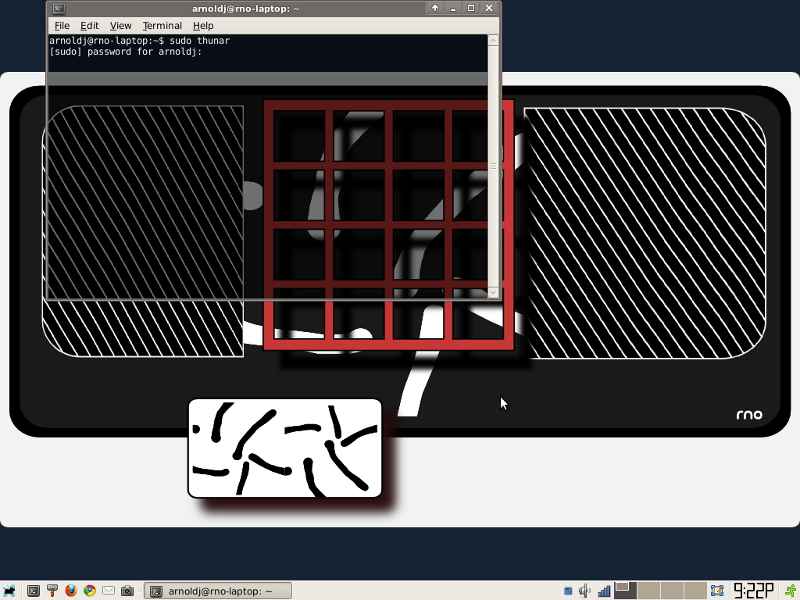
In the home folder goto the GIMP 2.6 folder. It's a hidden folder, goto View and check hidden folders if you can't see it.


Close the windows and open the GIMP.
I selected a brush I made circled in blue (5 dots angled to the right), from the brush menu.


the hand that rocks the mouse
The fascination I have with drawing instead of photo manipulation is something that has grabbed me from the very start. To tell you the truth when I take a camera picture I don't have a habit of messing with it. But I guess you can get quite artful with that. In all my paper wasting days I have always wondered what I might fit on a blank page. Sometimes I know what I see in my head will not materialize because I haven't got the specific skills to put it on paper the way I see it.
This all is awkward because if people ask me to share my GIMP skills with a group I would have to tell them how little interest I have in photo manipulation. The other thing they ask for is how to draw stuff like a person or an object. I don't do people though I would like to draw objects the same as in my sketchbooks. Drawing with a mouse is like tying a pencil to your elbow. I can see why computer clubs don't venture beyond fixing photos and scrap-booking.
Many, many computer artist are doing web graphics, desktop publishing, CD covers and what not. My interest are more design graphics, fine art, drawing, painting and my aim is the home. There is a certain thing with around the house art, while the cutting edge of art is complex, art for the home tends to be............what you thought I'd tell you? Depends on the persons living there.
I'm also looking for the illusive African Modern Style. The African art influence has been legendary for decades and yet there is no African Modern Style. There is Italian Modern, Scandinavian, even a Contemporary American Country. It's not directly about race, but Africa is the mother of us all. I think because there are so many geographic areas, climates, cultures, peoples, etc. in Africa that there is no one influence or school of thought to use as a framework for an African Style. More than not styles tend not to change as rapidly as trends and fashions. They are reworked in the latest appeal yet keep their essential classic elements. That is what makes them so endearing and when you talk to a designer they know what you are talking about. So, classic styles are a kind of a familiar language.
A lot of African style is wrapped up in textiles. You say Africa here and most see Kente cloth or Kuba raffias or Mali mudcloths, masks and drums. I had hoped the internet would cause an explosion of African influence in design down to the product level, that is, on the store shelves. This has not happened. What we have is so watered down it doesn't even pass for souvenirs. Folks here are still thinking safari and savannas and natives. There are progressive modern cities all over Africa filled with intelligent and creative people. If our American gov makes the connection, we children of slaves get shafted along with Africans getting bilked. If we children of slaves make the connection there is a transference of ideas and commerce. That is my opinion, but I haven't seen different yet.
Anyway, it is kind of cool to view but limit all the American influences. Again it is not so much a race thing as it is a cultural thing. This African culture is often not so apparent among American blacks as we are pushed to embrace diversity so very strongly these days. If we are left alone, the African comes out. Still seems if we are Afro-centric in any visible way we are suspect, labeled un-American and are in rebellion of the American Euro-centric way. OK, I admit I didn't come from Europe, so sue me. There is still a fight to be seen and heard in America, even today. And just because Hispanic peoples are taking the hits today doesn't mean Black peoples have arrived. The arts are often what is sustainable about any culture. We are all hip (hop) to what is the entertainment of the day. There are folks we've forgotten. They have devised the next cool thing already. The age is turning again keep your eyes open, you ain't seen nothing yet! Keep playing with the GIMP.
This all is awkward because if people ask me to share my GIMP skills with a group I would have to tell them how little interest I have in photo manipulation. The other thing they ask for is how to draw stuff like a person or an object. I don't do people though I would like to draw objects the same as in my sketchbooks. Drawing with a mouse is like tying a pencil to your elbow. I can see why computer clubs don't venture beyond fixing photos and scrap-booking.
Many, many computer artist are doing web graphics, desktop publishing, CD covers and what not. My interest are more design graphics, fine art, drawing, painting and my aim is the home. There is a certain thing with around the house art, while the cutting edge of art is complex, art for the home tends to be............what you thought I'd tell you? Depends on the persons living there.
I'm also looking for the illusive African Modern Style. The African art influence has been legendary for decades and yet there is no African Modern Style. There is Italian Modern, Scandinavian, even a Contemporary American Country. It's not directly about race, but Africa is the mother of us all. I think because there are so many geographic areas, climates, cultures, peoples, etc. in Africa that there is no one influence or school of thought to use as a framework for an African Style. More than not styles tend not to change as rapidly as trends and fashions. They are reworked in the latest appeal yet keep their essential classic elements. That is what makes them so endearing and when you talk to a designer they know what you are talking about. So, classic styles are a kind of a familiar language.
A lot of African style is wrapped up in textiles. You say Africa here and most see Kente cloth or Kuba raffias or Mali mudcloths, masks and drums. I had hoped the internet would cause an explosion of African influence in design down to the product level, that is, on the store shelves. This has not happened. What we have is so watered down it doesn't even pass for souvenirs. Folks here are still thinking safari and savannas and natives. There are progressive modern cities all over Africa filled with intelligent and creative people. If our American gov makes the connection, we children of slaves get shafted along with Africans getting bilked. If we children of slaves make the connection there is a transference of ideas and commerce. That is my opinion, but I haven't seen different yet.
Anyway, it is kind of cool to view but limit all the American influences. Again it is not so much a race thing as it is a cultural thing. This African culture is often not so apparent among American blacks as we are pushed to embrace diversity so very strongly these days. If we are left alone, the African comes out. Still seems if we are Afro-centric in any visible way we are suspect, labeled un-American and are in rebellion of the American Euro-centric way. OK, I admit I didn't come from Europe, so sue me. There is still a fight to be seen and heard in America, even today. And just because Hispanic peoples are taking the hits today doesn't mean Black peoples have arrived. The arts are often what is sustainable about any culture. We are all hip (hop) to what is the entertainment of the day. There are folks we've forgotten. They have devised the next cool thing already. The age is turning again keep your eyes open, you ain't seen nothing yet! Keep playing with the GIMP.
Saturday, November 27, 2010
Anybody seen my brush!
I'm going through the GIMP brushes and the one I want is not in there. The Mr. Impatient way of GIMP brushes is to draw and save as and put it in the hidden GIMP brush folder by hand, what a pain and good luck with that. The results is a brush with no good attributes. Here's what I discovered:
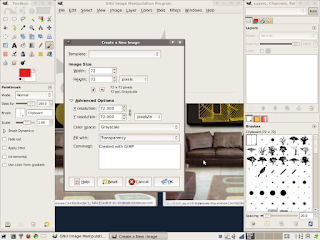
Make a new drawing, the size 72 x 72 (could be bigger, must be square).
Under Advanced options, set color to Grayscale (if you want brush to use whatever foreground color). Set the "Fill with" color to transparency. You should get this:
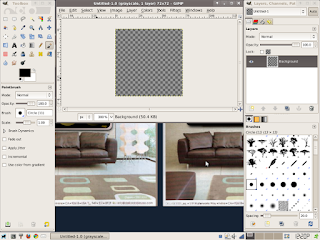
Draw on the transparent square, use shift + to make the image bigger.
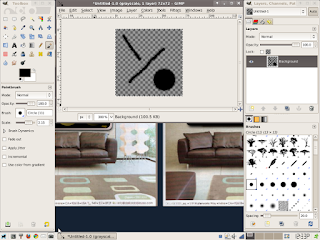
Hang on it's not a brush yet. Select "ALL" from the select menu and from the Edit menu "COPY" instead of save (in the file menu). Now here is the magic: "Paste AS" from the Edit menu and "New Brush". The dialogue box should appear. Give it a brush name and a file name with extension (.gbr).
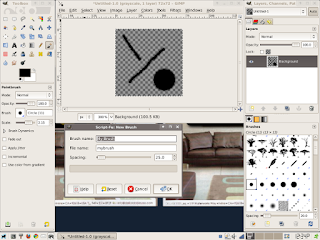
When you hit "OK" you have created a brush, the brush menu refreshes and your new brush appears and is ready to go.
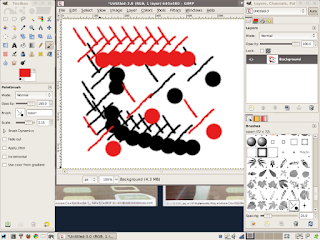 And if you wants to delete a brush, just right click and delete. If you delete it there is no getting it back.
Perhaps I am a little crude here but in time I will have all the finesse of a Hollywood movie. Hey did you hear the one about the painter who plucked his own beard to make his own brush. This is way easier than pulling hair. I read a GIMP Bible, watched a video tutorial, fiddled and condensed it into an experience. See, the Linuxville guide is into GIMPtitude and giving it to you.

Make a new drawing, the size 72 x 72 (could be bigger, must be square).
Under Advanced options, set color to Grayscale (if you want brush to use whatever foreground color). Set the "Fill with" color to transparency. You should get this:

Draw on the transparent square, use shift + to make the image bigger.

Hang on it's not a brush yet. Select "ALL" from the select menu and from the Edit menu "COPY" instead of save (in the file menu). Now here is the magic: "Paste AS" from the Edit menu and "New Brush". The dialogue box should appear. Give it a brush name and a file name with extension (.gbr).

When you hit "OK" you have created a brush, the brush menu refreshes and your new brush appears and is ready to go.
 And if you wants to delete a brush, just right click and delete. If you delete it there is no getting it back.
Perhaps I am a little crude here but in time I will have all the finesse of a Hollywood movie. Hey did you hear the one about the painter who plucked his own beard to make his own brush. This is way easier than pulling hair. I read a GIMP Bible, watched a video tutorial, fiddled and condensed it into an experience. See, the Linuxville guide is into GIMPtitude and giving it to you.
Thursday, November 25, 2010
reinventing the bookshelf
Oh man, I got all the cool apps but I don't know how to use them. The way it goes is that you install it then you dabble with it. That is you use all the easy stuff. Soon you want to tackle a challenge and duh! Ok, then you scour the net to find every ebook and manual in PDF format or HTML you can find. Soon you have files and folders all over the place. Linux has this app called Calibre, a master at organizing ebooks. You can suck in ebooks in different formats, convert them to one standard format (of your choice), then view them with a few clicks. Here is a pic:
 I guess I could demand it be more automated sort of like Picasa but I am happy to have it as it is. Picassa scans your hard drive for every picture, makes a thumbnail and puts it in a menu tree. Calibre does give you control over what gets selected but once selected it is awkward to remove other than delete. Mostly I go into the Ubuntu system file manager and move the file to another directory, then refresh Calibre. Calibre is so handy and as usual I do all the easy stuff first, there are deep and hidden secret powers lurking beneath the interface.
I am migrating toward using the PC as a complete system to handle most home media. It is a trend any electronic handy person can envision. PCs can do TV with a card and cable service is a plus, internet, play audio and video files, be a reader of various documents, do email, internet browse/search, calculate and control. Books in print just might become rare, what was that? Gutenberg turning in his grave? I can see more and more book shelves being knick-knack displays. There on the shelf is your favorite picture, it's a digital picture frame. At rest, it's a photo display, when you pick it up, it's a wifi-pad to the house computer.
You think I am nuts, my brother had a VHS video collection that could be used as a sofa. If that many videos could be stored and played off a 1 terabyte hard drive, a huge chunk of living room real estate has been recovered. Add to this a collection of books, magazines and newspapers. Actually the local library should have an online service where you can for a small fee read anything online on demand, no need to download. But what about human contact. Walk into the library with your wifi-pad or trade your card for one of the library's.
Having the work on one workspace and the manual or tutorial on another is a big deal. I find I have to practice some skills over and over till I got them down, you know the repeatable results thing. Then I can tweak them and discover new stuff. No joke, I can sit at my PC all day and not waste a minute. And I am just an average Joe. OK, I'm a geeky Joe.
Somehow I think there needs to be a difference in the personal computer (single user) and the home computer (shared users). If we can mash together the business server with multiple home users (family members PCs) we can manage personal data and shared data. We just have to make it practical. This can be done with present day off the shelf parts and we haven't even talked about controlling the home life support and security systems.

I am migrating toward using the PC as a complete system to handle most home media. It is a trend any electronic handy person can envision. PCs can do TV with a card and cable service is a plus, internet, play audio and video files, be a reader of various documents, do email, internet browse/search, calculate and control. Books in print just might become rare, what was that? Gutenberg turning in his grave? I can see more and more book shelves being knick-knack displays. There on the shelf is your favorite picture, it's a digital picture frame. At rest, it's a photo display, when you pick it up, it's a wifi-pad to the house computer.
You think I am nuts, my brother had a VHS video collection that could be used as a sofa. If that many videos could be stored and played off a 1 terabyte hard drive, a huge chunk of living room real estate has been recovered. Add to this a collection of books, magazines and newspapers. Actually the local library should have an online service where you can for a small fee read anything online on demand, no need to download. But what about human contact. Walk into the library with your wifi-pad or trade your card for one of the library's.
Having the work on one workspace and the manual or tutorial on another is a big deal. I find I have to practice some skills over and over till I got them down, you know the repeatable results thing. Then I can tweak them and discover new stuff. No joke, I can sit at my PC all day and not waste a minute. And I am just an average Joe. OK, I'm a geeky Joe.
Somehow I think there needs to be a difference in the personal computer (single user) and the home computer (shared users). If we can mash together the business server with multiple home users (family members PCs) we can manage personal data and shared data. We just have to make it practical. This can be done with present day off the shelf parts and we haven't even talked about controlling the home life support and security systems.
Tuesday, November 23, 2010
talking penguins, dude snap out of it!
I walk away from the penguin a bit anxious, I turned, threatened to sand board him (they like the water), he squawked, muttering about Mutter and the end of the 'X' windowing systems as we know it. Then before I could ask more he quickly donned his shades, trench coat, fedora, slipped into the crowd and..... where'd he go?
There is all kinds of mysteries in the Linuxville streets, the talk that Linux has no curb appeal has been slung in the gutters and in the burgs (icebergs) for years. Somebody finally has the nerve to do something different and change the present situation. All of a sudden he is sick of mind, an evil genius who will force us all to comply. Users, fickle as a pickerel, crying "fix it but don't change it!" Legacy, is such a lovely word, all new stuff is so untrue. But that is not how the song goes, progress, innovation, improvements are all at the expense of trimming off the past. Some genetic scientist is injecting color into the penguin population and the gnu is still a wildebeest only a bit wilder. The nature of Linux is in it's parts and how they are put together. I am sure there will be for a time things as they are now, but for the future not to come, that is not the Linux way.
What if penguins are really distant cousins to humming birds? There was a fork in the species, a wrong turn in migration and a liking for formal wear!
Oh man, good nap! The dream seemed so real. Better get back to work.
There is all kinds of mysteries in the Linuxville streets, the talk that Linux has no curb appeal has been slung in the gutters and in the burgs (icebergs) for years. Somebody finally has the nerve to do something different and change the present situation. All of a sudden he is sick of mind, an evil genius who will force us all to comply. Users, fickle as a pickerel, crying "fix it but don't change it!" Legacy, is such a lovely word, all new stuff is so untrue. But that is not how the song goes, progress, innovation, improvements are all at the expense of trimming off the past. Some genetic scientist is injecting color into the penguin population and the gnu is still a wildebeest only a bit wilder. The nature of Linux is in it's parts and how they are put together. I am sure there will be for a time things as they are now, but for the future not to come, that is not the Linux way.
What if penguins are really distant cousins to humming birds? There was a fork in the species, a wrong turn in migration and a liking for formal wear!
Oh man, good nap! The dream seemed so real. Better get back to work.
Subscribe to:
Posts (Atom)